These days almost all the proffessional sound card interfaces are designed for firewire (IEEE 1394) port. Firewire port is considered to be more stable than USB 2.0 port (this is my opinion - others may differ). But people face problems also with firewire port if they have Windows Xp with SP2 installed.
There is an article "Performance of 1394 devices may decrease after you install Windows XP Service Pack 2" if you want to check on microsoft's site. The performance drops because Windows XP SP2 changes 1394b ports to S100 speed. So if you connect a sound card which is designed to run at S400 speed will not function properly since the data transfer rate has dropped considerably.
To solve this problem you need to edit/modify your registry entry as mentioned below:
WARNING!! - Only make changes if you know about registry. Backup your registry before attempting any change since it could leave your system unbootable if any mistake is done.
1. Click Start, click Run, type regedit, and then click OK.
2. Locate and then click the following registry subkey:
HKEY_LOCAL_MACHINE\SYSTEM\CurrentControlSet\Enum\ PCI\1394_hc_hw_id\1394_instance_id\Device Parameters
3. If the SidSpeed value does not exist in the right pane after you click the Device Parameters subkey in step 2, create it. To do this, point to New on the Edit menu, click DWORD Value, type SidSpeed, and then press ENTER.
4. Right-click SidSpeed, and then click Modify.
5. In the Value data box, type one of the values that are shown in the following table, and then click OK.
Value Speed
0 ------ S100 speed
1 ------ S200 speed
2 ------ S400 speed (default value)
3 ------ S400/S800 speed (Windows XP Service Pack 1 [SP1] value)
Note If you try to use a value that is larger than 3, SidSpeed will use a value of 0 (S100 speed).
6. Quit Registry Editor.
To locate the FireWire controller information, follow these steps:
1. Open Device Manager. To do this, right-click My Computer on the Start menu, click Manage, and then click Device Manager under System Tools. You can also click Properties under My Computer, and then click Device Manager on the Hardware tab.
2. Locate your FireWire controller in the IEEE 1934 Bus host controllers section.
3. Right-click the FireWire controller entry, click Properties, and then click the Details tab.
4. Click Device Instance Id. You see a string of letters and numbers that is similar to the following:
PCI\VEN_104C&DEV_8020&SUBSYS_00D81028&REV_00\4&19FD8D60&0&60F0
The information between the two slash marks (\) is the “1394_hc_hw_id".
“VEN_104C&DEV_8020&SUBSYS_00D81028&REV_00” is the hardware ID in this example. The information that follows the second slash mark (\) is the “1394_instance_id”. “4&19FD8D60&0&60F0” is the instance ID in this example.
If you are confused do not attempt yourself - instead consult some computer technician.
Showing posts with label Sound Card. Show all posts
Showing posts with label Sound Card. Show all posts
Monday, November 19, 2007

Saturday, May 12, 2007
TIPS: Audio drop outs due to Hard Disk
Do you know that the cause of the drop out can be your Hard disk ? Yes I came across two such cases last week where the cause of drop out was Hard disk. The first and foremost thing anyone can suspect is the buffer setting when someone faces drop outs - But the case here was totally different. One of my friend was using Motu 2408 MK3 whereas the other was using M-Audio Audiophile 192. The problem was that they were able to play wave, mp3 or other media files normally using media player without any drop outs. But the problem use to reflect when they were using some audio Daw or sequencer with audio on multi tracks.
Due to some hard disk error the UDMA mode of hard disk got changed to either PIO or UDMA-0 mode causing this problem. Since all the Hard disk are set to UDMA-5 (UDMA100), the data transfer rate is 100MB/sec. Hence the problem showed up only when multi track were played since more audio files are read simultaneously from the Hard disk and since the data transfer mode was set to lower rate - all the data was not being read in time causing drop outs.
So next time you face drop outs in your multi track program check if your data transfer mode is changed or not. Open system in control panel - go to hardware device manager - Check in primary and secondary IDE channel under IDE ATA/ATAPI Controller. Under advance tab of primary and secondary IDE channel see if the transfer mode is set to UDMA Mode 5 or higher.
Hope this will help those who are facing drop outs despite of correct buffer settings.
Friday, March 30, 2007
Latest fast and powerful audio workstation based on Intel Core 2 Duo processor
These days I am busy assembling a new powerful audio workstation for one of my friend. The robust system is consists of the following:
 this system provides ample memory for vsti plugins to load samples and tracks. You should be aware that while using a multi-track recording software the increase in the number of audio tracks increases load on CPU because all the processing takes place in real time ( no pre-rendering). If you are using vst or dx plugins such as delay, reverb, compressor etc as inserts, they further add to processing consumption. Then comes the load of vsti which are very popular these days in making music tracks.
So in order to work smoothly you need a powerful system and the configuration mentioned above will be helpful.
- Intel Media Series Desktop Board DG965WH
- Intel Core 2 Duo Processor E6600, LGA775 Pkg. 2.40 GHz, 4MB L2-Cache, 1066 MHz FSB
- Transcend 4GB DDR2 RAM 800 MHz ( 4 x 1GB DIMM's )
- Sony 1.44 inch Floppy Drive
- Seagate SATA ST3250824AS 250Gb x 2 ( Total 500GB )
- LiteOn 20X DVD/CD Writer and Rewriter
- Microsoft Wireless Optical Desktop 700
- iBall Cabinet with Extra Chassis Fan Model: - Work Horse (SILVER)
- Power Safe 400 Watts SMPS Gold
- Samsung Sync Master 940NW 19" wide LCD monitor
- Windows XP Professional with SP2
 this system provides ample memory for vsti plugins to load samples and tracks. You should be aware that while using a multi-track recording software the increase in the number of audio tracks increases load on CPU because all the processing takes place in real time ( no pre-rendering). If you are using vst or dx plugins such as delay, reverb, compressor etc as inserts, they further add to processing consumption. Then comes the load of vsti which are very popular these days in making music tracks.
So in order to work smoothly you need a powerful system and the configuration mentioned above will be helpful.
Saturday, March 17, 2007
TIPS: Midi recording problem in Nuendo 3.2 with Edirol FA-66 FireWire audio interface
Problem: Last week one of my client faced a peculiar problem in Nuendo 3.2 while sequencing ( recording midi tracks ). The midi notes would not get recorded despite being played and heard while recording.
The nature of symptoms for such problem are :
I connected FA-66 to other system and found working properly without any midi loss at all. I even tried VIA based FireWire card in the same system with no success. The problem is that Nuendo 3 midi port handling is not compatible with D945GNT motherboard as you encounter the problem while using this motherboard only.
Solution:See that you should have DirectX 9.0c installed properly if you are using emulated Direct Music Midi ports.
 Just check the box as shown above in the figure and it should solve all your midi timing and recording problems.
The nature of symptoms for such problem are :
- Persistent timing problems (shifted notes etc.) while using native or emulated Direct Music midi ports.
- Using emulated Direct Music midi ports often results in shifted MIDI events while recording (events are recorded too late or too early).
- After recording for a while the MIDI events are not recorded at all despite of being played and heard while recording.
- Sometime after recording you find that all the notes have been shifted to the beginning of the sequenced event.
I connected FA-66 to other system and found working properly without any midi loss at all. I even tried VIA based FireWire card in the same system with no success. The problem is that Nuendo 3 midi port handling is not compatible with D945GNT motherboard as you encounter the problem while using this motherboard only.
Solution:See that you should have DirectX 9.0c installed properly if you are using emulated Direct Music Midi ports.
- If you are using Direct Music midi Ports then you should enable (check) the option “Use System Timestamp” provided in the Direct Music midi section of the Device Setup dialogue. This option uses another timing reference in your system when enabled.
- If you are using Windows midi port then you should enable (check) the option “Use System Timestamp” provided in the Windows Midi section of the Device Setup dialogue. This option uses another timing reference in your system when enabled.
Just check the box as shown above in the figure and it should solve all your midi timing and recording problems.
Friday, February 16, 2007
TIPS: Audio Drop outs due to low latency
Day before yesterday I was at one of my friends place to solve his problem of drop outs. He was experiencing drop outs with increase in number of Audio tracks. The hardware he was using was TASCAM FW 1804 and the buffer was set to 256 samples for a latency of 9.9 milliseconds approximately. The number of tracks in the particular project he was having problem had went up to 126 Tracks.
We increased the buffer to 1024 samples ( increasing the latency) and the problem was solved. Even if you have audio events only on few tracks - the increase in number of tracks blocks resources for itself when you are using asio drivers. So if you want to work with more audio tracks, you will have to increase latency in order to avoid drop outs. Otherwise try to keep the number of tracks somewhere between 30 to 40 for smooth operation, if you are using vst instrument and looking for lower latency to program midi. Nowadays almost all software's come with a " FREEZE " feature which allows you to freeze you midi track and unload your vst instrument freeing extra resources. When you freeze a vst instrument - the midi track gets converted into audio file and is routed through the vst track.
I will explain freeze function some other day. Now if you ever experience drop outs while working on a project don't panic.
Friday, February 9, 2007
Latest reasonable Computer Configuration for Audio recording
Yesterday I configured a Computer system for one of my friend. It was performing very well. The details are given below :
- Motherboard - Intel 965WH
- CPU - Intel Core 2Duo 6300 ( 1.86 Hz with 2 Mb cache)
- RAM - DDR2 667 MHz 1 Gb
- Hard Disk - Seagate SATA 250 Gb (8 Mb buffer)
- DVD Writer - Liteon Alrite 20 x
- Floppy - Sony
- Keyboard & Mouse - Logitech Keyboard with optical Mouse
- SMPS - Gold
- Cabinet - iBall
- Monitor - Samtron 740N 17" LCD Display
- Sound Card - Edirol UA25 USB audio interface
Friday, December 22, 2006
Edirol FA-66 24Bit/192kHz FireWire Audio Capture Interface
Here is some good news:- Edirol FireWire audio interface FA-66 supports upto 192Khz sampling rate. Further the Edirol FA-66 24Bit/192kHz FireWire Audio Capture comes with a FREE copy of SONAR LE.
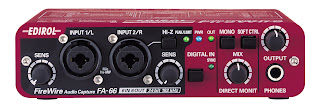 FA-66 is a economical alternate to FA-101 with almost all features identical except the number of inputs and outputs (FA-66 is a 6in 6 out Card). It has 4 analogue inputs and 4 analogue outputs only along with digital stereo in and out (optical).
 You get the same high sound quality as FA-101 at a lower price , only the number of I/O's has been reduced in FA-66. Nice card at a decent price.
FA-66 is a economical alternate to FA-101 with almost all features identical except the number of inputs and outputs (FA-66 is a 6in 6 out Card). It has 4 analogue inputs and 4 analogue outputs only along with digital stereo in and out (optical).- The only limitation in FA-66 is that you will not be able to use digital i/o with 192Khz setting.
- There is one extra feature in this card as compared to FA-101. It has a switchable analogue limiter at input 1 which is very useful while recording vocal and other live instruments.
- There is a input level adjustment control in the rear for inputs 3 and 4.
- The inputs 3 and 4 are unbalanced RCA type.
You get the same high sound quality as FA-101 at a lower price , only the number of I/O's has been reduced in FA-66. Nice card at a decent price.
Wednesday, December 20, 2006
Edirol FA-101 Firewire Audio Interface
I have heard the sound of many soundcards including those expensive ones. But to be honest I liked the Analog warmth and clear rounded Highs of this soundcard without any sign of harshness.
 This 24 bit card is easy to connect to PC or Laptop through Firewire port. Supports upto 192Khz sampling frequency. The best part is that the clock is selected and locked through clock selector knob on the interface and not through software. So you get more stability and no auto change of clock occurs during different projects.
 It has a Balanced analogue stereo master monitor out apart from 6 other analogue Balanced outs. The Input 1 and 2 supports balanced Mic/Line with gain control and switchable phantom power. The other 6 analogue inputs (3 through 8) are line inputs with attenuation Knob on the rear for gain control of input 7 and 8.
Input 2 can also be used as high impedance guitar input by pressing the seletor switch provided in the front beside the gain control.
The card has a pair of digital (optical) ins and outs labeled 9 and 10 in the front. The card supports direct monitoring with a balance controller knob in the front for adjusting the main out and monitoring out levels. It has a stereo headphone out in the front with independent level control.
It has a midi in and out also in the rear. You can provide the power to the unit from your pc/Laptop or external adaptor provided with the unit. It has a two way on/off switch to select the power source either from computer or power adaptor.
There is no latency problem in the unit and works fine up to 2ms "ASIO Drivers provided". More stable with VIA firewire card ..... my experience...... although the company recommends Texas Instruments. You can try PYRO PCI 64 but why to put extra money when ordinary VIA card works fine.
If you believe your ears then you can tell the difference of sound quality yourself after hearing the sound of this card.
Soon I will review some other cards too. Till then just make some new tracks!!!
Subscribe to:
Posts (Atom)
Popular Posts
-
 As we all know that for past so many years we have been using hardware synthesizers and Samplers in creating music. But now the time have c...
-
 SONAR LE Cakewalk's Sonar LE is a OEM music production software bundled with the following Brand products : Roland , Edirol , EMU produc...