Monday, May 27, 2013

Guitar Pro 6 Lite with FREE Registration and Activation

Guitar Pro 6 is a complete workshop for all guitarists — amateur or professional — who wish to improve, write music, or simply use a virtual backing band. Guitar Pro 6 supports all fretted instruments from 4 to 8 strings (guitars, basses, banjo, mandolin, and so on), as well as all and any instruments that can be in your band or orchestra.

Here’s what Guitar Pro offers you:
  • A complete yet user-friendly Multitrack, Tablature based score editor for stringed instruments, which includes all the usual symbols and specificities of those instruments;
  • Optimized screen-display options
    (And in the full version: a powerful audio engine designed to yield faithful playback of the sounds and effects of all types of guitars as well as of a hundred other instruments (bass, strings, piano, drums, etc.), from samples and modelized sounds of amps and effect units recorded in a professional studio);
  •  Everyday tools for practice - such as the tuner, the chord engine, the scale engine, the guitar fretboard, etc.;
  •  Opening out onto the world - allowing you to make the most of hundreds of thousands of scores available on the Internet.
Guitar Pro 6 Lite
Guitar Pro 6 Lite
Exclusive Offer by Guitar Interactive Online Magazine:
Guitar Pro Lite is offered FREE by Arobas Music for Guitar Interactive subscribers! Proceed to promo page wherein it is mentioned that Registered readers of Guitar Interactive can download a FREE copy of Guitar Pro 6 Lite. Although subscription to Guitar Interactive Online Mag is free but you can also get it by just going here.

Just enter your email address and you will receive a mail containing User ID and Key ID within minutes along with downloading instructions (you will need to register at Guitar-pro.com to download the installer). After installation Guitar Pro 6 Lite can be activated either online or offline as well.

Guitar Pro 6 Lite is perfect for editing TAB for guitar, bass, and other 4- to 8-string instruments. It is compatible with both Windows and Mac operating systems. Guitar Pro 6 Lite is a powerful editing tool and each license will also give users a preferential upgrade (with a 50% discount) to the full version!

Sunday, February 17, 2013

Advanced MP3 Converter 5.0 with Free Registration Code

Advance MP3 converter 5.0 for windows is a high quality audio conversion tool which supports protected or unprotected loss-less music files. Advanced MP3 Converter can convert or batch convert popular audio formats such as MP3, WMA, WAV, OGG, APE, MPC, CUE, AAC, MP4, M4A, TTA, AC3, FLAC, OptimFROG, Speex, WavPack, ALAC etc. from one format to another. It also supports some editing features such as cut ,split and re sampling. Audio conversion is fast since it is done without creating any temporary file on the hard disk. It supports editing of music tags such as MP3 id3 v1, MP3 id3 v2 as well as APE, MP4 and WMA tags. Automatic volume normalization is also done while conversion.

Advance MP3 Converter 5.0

Advanced MP3 Converter supports WMA 9/10/24bit format. WMA 9 with constant bit rate, quality based WMA 9/10/24bit format with variable bit rate, two-pass bit rate based WMA 9/10/24bit format with variable bit rate and WMA 9/10/24bit Lossless format, which allows you to store your digital audio with best quality. For MP3 encoding it uses fast LAME encoder 3.98 and for OGG encoding it uses latest Vorbis SDK updates. For APE encoding it uses the lasted version.

For more details you can visit the Product Page.

System requirement: Microsoft Windows 7/ Vista/ 2000 / XP /Sever 2003/2008/ready for Window 8.

Advanced MP3 Converter is normally priced at $24.95 per registration code. But Mp3do.com is offering Free Registration code for a limited time period. Visit this page to grab the free key [Standard CUE Edition] and then download Advanced MP3 Converter from this link.

Saturday, February 16, 2013

ब्लॉग लेख फिर आरम्भ

मेरे पिछले दो साल काफी परेशानी के दौर से गुजरे हैं। हालाँकि हालात अभी भी मेरे नियंत्रण में नहीं हैं। फिर भी मैंने किसी प्रकार से कुछ समय ब्लॉग को समर्पित करने का निर्णय लिया है।

खुश हो जाओ! मैंने अपने ब्लॉग का template बदल कर इसे एक नया रूप दे दिया है। अगले हफ्ते से मैं ब्लॉग लिखना शुरू करूंगा।

Blogging resumed again

I have been through a lot of hardship in past two years. Although things are still not in my control but I have decided to somehow devote some time to my Blog.

Cheer up ! I have changed my blogs template to give it a fresh look. I will start posting next week onwards.

Thursday, February 4, 2010

Defragment problem solved at last

De-fragmentation is complete for: (C:)

Some files on this volume could not be De-fragmented.
Please check the defragmentation report for the list of these files.

In my previous article I mentioned to use RECUVA to solve De-fragment problem with the above mentioned error. Unfortunately the problem re-appeared after a few reboots and defragment sessions.

Thinking that the problem was due to MFT (Master File Table) fragmentation, I tried Paragon Total Defrag 2009 - Not to be mention that it is a powerful tool for de-fragmenting MFT as well as compacting MFT. It worked well but the problem still crept in after a few reboots. And I was shocked when I noticed that although the MFT (Master File Table) was not fragmented still the windows Defrag utility was giving the same error - "Some files on this volume could not be De-fragmented".

After trying almost all De-frag Utilities I downloaded JKdefrag. After running JKdefrag I came to know from its log that the following files were not getting De-fragmented viz. C:\$extend\$usnjrnl:$j$data and D:\$extend\$usnjrnl:$j$data.

These are parts of NTFS structure the update sequence number ($USN) Journal is not read or used by Windows but are used by other applications essential to the health and proper operation of the NTFS file system. It is disabled by default and only activated when invoked by any application which uses this feature.

For More details you can check the following links:
Recently. I had installed Voidtools "Everything" which was using this feature. Immediately I opened Everything and disabled USN journal logging in the options.

There after I ran JKdefrag again and checked the log file just to find that there was no trace of fragmented "\$extend\$usnjrnl:$j$data".

Finally the problem got solved and now even the Windows default Defrag utility ran perfectly without giving error anymore.

JKdefrag was the only apllication which showed details in its log file as compared to Auslogics Disk Defrag, Defraggler, Smart Defrag & Paragon Total Defrag 2009. Since these are hidden files (Marked with $) they don't show-up in windows Defrag utility's Log file either.

If you are unable to identify the application which is using USN Journal then you can use Fsutil.exe (present in Windows XP system folder) to delete or modify USN Journal

Hope this will help people facing similar issue.

Sunday, January 24, 2010

Some files on this volume could not be De-fragmented

Recently I encountered a typical problem in windows XP pro SP3. I have a SATA hard drive in my system with one primary partition (C:) and two logical extended partitions viz. D: & E: drives.

After successfully De-fragmenting the partitions, I received the following message for drives C: and D: .

De-fragmentation is complete for: (C:)

Some files on this volume could not be De-fragmented.
Please check the defragmentation report for the list of these files.

Inside the report it was not showing any fragmented files at all. Neither any file was reflected even after re-analyzing the drives. Thereafter I tried to defrag the MFT (Master File Table) using Paragon Partition Manager 8,5 - which fixed the problem on both the drives.

But all went in vein when the problem reappeared in drive C: after a few boots and system's De-frag utility was not able to fix it at all.

Since De-fragmenting the MFT was taking a huge time (nearly 1-2 Hours) ; it was not feasible to run it every now and then.

So I started searching for permanent remedy - the problem was in the MFT (Master File Table) which increases in size and gets fragmented over the time. And this is not rectified by systems's default defrag utility (One has to use third party utility to defrag MFT). When we delete a file the deleted file's entry remains in the MFT adding to its size.

Surprisingly I used "RECUVA" - yes you are right, it is for recovering deleted files. But there is a feature in Recuva called "Secure Overwrite ..." - which is used to permanently erase the deleted files from the disk and make them unrecoverable for ever.

Solution:
  1. Open "RECUVA".
  2. Select the Drive (In my case it was C:)
  3. Run "Scan" without entering anything in the search box.
  4. A list of files will appear after the scan. Check tick in all the boxes.
  5. Now right click and select "Secure Overwrite Checked".
  6. It will take some time and will not be able to delete all the files.
  7. But the problem will be solved.
Yes now, after performing the above process, I ran defrag once again on the drive C:.

VIOLA!! - no error anymore - ALL FIXED.

Read this for the final solution.
Do let me know if it worked for you
.

Friday, January 1, 2010

वेवोसौर नि:शुल्क (मुफ्त) एडिटिंग सॉफ्टवेर

वेवोसौर एक वेव एडिटिंग सॉफ्टवेर है जो मुफ्त में उपलब्ध है। इसको आप वेव फाइल (wave file) अथवा एमपीथ्री फाइल (MP3 File) प्रोसेस या एडिट करने के प्रयोग में ला सकते हैं। इसमें कट, कॉपी और पेस्ट जैसे प्रावधान हैं जो आपको किसी भी प्रकार की ऑडियो फाइल को एडिट करने मैं मदद कर सकता है। वेवोसौर में वीएसटी (VST) प्लगइन, एसीओ (ASIO) ड्राईवर, अनेक चैनल (Multichannel) वाली वेव फाइल एवं रियल टाइम एफ्फेक्ट प्रोसेसिंग करने की क्षमता है।

इस प्रोग्राम की खासियत है की इसको इन्स्टाल करने की कोई ज़रुरत नहीं है। आपको सिर्फ एक फाइल डाउनलोड करनी है और बस वही फाइल रन करने से प्रोग्राम चालू हो जाता है। ये प्रोग्राम रजिस्ट्री में भी किसी प्रकार की एंट्री नहीं बनता है। वेवोसौर एक पोर्टेबल प्रोग्राम के रूप में काम करता है।


इसको आप विंडोस ९८ (Windows 98), एक्सपी (Windows XP) एवं विस्ता (Vista) में चला सकते हैं।

अधिक जानकारी के लिए इस सॉफ्टवेर की वेबसाइट या होमपेज पर जा सकते हैं। इसकी विस्तृत कार्य क्षमता की जानकारी हेतु आप इस प्रोग्राम की वेबसाइट में फीचर पेज पर जाएँ।

सॉफ्टवेर का नवीनतम वर्जन है १.०.८.० जिसे आप यहाँ से डाउनलोड कर सकते हैं।

आशा है की यह प्रोग्राम ऑडियो के क्षेत्र में कार्य करने वाले काफी लोगों के काम आयेगा।

Wavosour Free Editing Software

Wavosour is a free audio editing software for processing and recording sounds, wave and mp3 files. Wavosaur has all the features to edit audio (cut, copy, paste, etc.) produce music loops, analyze, record, batch convert.
Wavosaur supports VST plugins, ASIO driver, multichannel wav files, real time effect processing.
The program has no installer and doesn't write in the registry. Use it as a free mp3 editor, for mastering, sound design. The Wavosaur freeware audio editor works on Windows 98, Windows XP and Windows Vista.
Go to the features page for an overview of the software.
The Homepage of the software is here.

You can download the latest version 1.0.8.0 from here.

This is a nice software with no installation and works as a portable application. It is still under developement but approaching towards a professional stage.

The best part is that the program has a very small single binary (exe) file with all the features.

Hope this will be of use for many audio enthusiasts.

नए साल २०१० की शुभकामनाएं

मेरी तरफ से आप सब को नए साल २०१० की शुभकामनाएं ! आप सभी लोगो को नया साल बहुत बहुत मुबारक हो । इस वर्ष मैं कुछ हिंदी का प्रयोग करना चाहता हूँ । आशा है की जिनको अंग्रेजी समझने में कठिनाई होती है उनकी कुछ मदद हो जाएगी । कृपा करके मुझे बतायें की मैं सिर्फ अंग्रेजी में ही लिखूं या कुछ कुछ हिंदी में भी लिखूं ?

धन्यवाद ।

Happy New Year 2010

Wish You All a very Happy and Prosperous New Year 2010

Thursday, April 2, 2009

New Tips & Tricks

Hi,
I am extremely sorry as I was not being able to take out any time for my blog last year. But now I will be posting new reviews and troubles shooting as well.

Hope you understand my position as I have mentioned somewhere else that Last year I was quite busy and touring. So it was not possible for me to take out time to update my blog.

Tuesday, January 1, 2008

Happy New Year 2008

WISH YOU ALL

A VERY VERY HAPPY AND PROSPEROUS

"NEW YEAR 2008"

I hope that this year I will be able to provide some more Tips & tricks related to audio softwares. I will also review some Free VSTi Plugins also.

Tuesday, December 25, 2007

Merry Christmas 2007

WISH YOU ALL MERRY CHRISTMAS 2007

May Christmas bring you joy and happiness this year.

WITH LOT OF LOVE

From

"me"

Monday, November 19, 2007

TIPS: Configure your Firewire Port (IEEE 1394) for proper operation of Sound Card in WinXP SP2

These days almost all the proffessional sound card interfaces are designed for firewire (IEEE 1394) port. Firewire port is considered to be more stable than USB 2.0 port (this is my opinion - others may differ). But people face problems also with firewire port if they have Windows Xp with SP2 installed.
There is an article "Performance of 1394 devices may decrease after you install Windows XP Service Pack 2" if you want to check on microsoft's site.  The performance drops because Windows XP SP2 changes 1394b ports to S100 speed. So if you connect a sound card which is designed to run at S400 speed will not function properly since the data transfer rate has dropped considerably.
To solve this problem you need to edit/modify your registry entry as mentioned below:
WARNING!! - Only make changes if you know about registry. Backup your registry before attempting any change since it could leave your system unbootable if any mistake is done.
1. Click Start, click Run, type regedit, and then click OK.
2. Locate and then click the following registry subkey:
HKEY_LOCAL_MACHINE\SYSTEM\CurrentControlSet\Enum\ PCI\1394_hc_hw_id\1394_instance_id\Device Parameters
3. If the SidSpeed value does not exist in the right pane after you click the Device Parameters subkey in step 2, create it. To do this, point to New on the Edit menu, click DWORD Value, type SidSpeed, and then press ENTER.
4. Right-click SidSpeed, and then click Modify.
5. In the Value data box, type one of the values that are shown in the following table, and then click OK.
Value Speed
0 ------ S100 speed
1 ------ S200 speed
2 ------ S400 speed (default value)
3 ------ S400/S800 speed (Windows XP Service Pack 1 [SP1] value)
Note If you try to use a value that is larger than 3, SidSpeed will use a value of 0 (S100 speed).
6. Quit Registry Editor.
To locate the FireWire controller information, follow these steps:
1. Open Device Manager. To do this, right-click My Computer on the Start menu, click Manage, and then click Device Manager under System Tools. You can also click Properties under My Computer, and then click Device Manager on the Hardware tab.
2. Locate your FireWire controller in the IEEE 1934 Bus host controllers section.
3. Right-click the FireWire controller entry, click Properties, and then click the Details tab.
4. Click Device Instance Id. You see a string of letters and numbers that is similar to the following:
PCI\VEN_104C&DEV_8020&SUBSYS_00D81028&REV_00\4&19FD8D60&0&60F0
The information between the two slash marks (\) is the “1394_hc_hw_id".
“VEN_104C&DEV_8020&SUBSYS_00D81028&REV_00” is the hardware ID in this example. The information that follows the second slash mark (\) is the “1394_instance_id”. “4&19FD8D60&0&60F0” is the instance ID in this example.
If you are confused do not attempt yourself - instead consult some computer technician.

Saturday, September 15, 2007

TIPS: Creating new project in SONAR LE

Sonar LE is a nice DAW for music creation. I will explain what all things you should observe while creating a new project in Sonar LE.

Go to options > Global > select Audio Data TAB as shown below.

Enable the "Use Per-Project Audio Folders" option by checking the box. This will help you to keep all the audio data related to particular project in their respective project folders. So you will not mess up all your audio files related to different projects into one single Global Audio Folder since this will make individual audio sub-folder for each project inside the project folder.

After opening Sonar and enabling the Use Per-Project Audio Folders - close the default song.

Select New from File menu ( File > New... ) it will open a dialog as shown below.

Give a Name to your project as shown below. You will notice that when you enter the project name the Path mentioned below gets modified by itself and creates a Folder with the Project Name and a sub Folder named Audio.

You can select whether you want to use any pre-designed template from the list or a normal blank project document.

Now select save as and save the project in Normal mode.

Before setting the Tempo of the project you should set Meter / Key Signature. By default, a new SONAR LE project is in 4/4 time and the key of C major.

To edit open the "Meter/Key View" as shown below.

Click on "insert Meter/Key" as shown below.

A new window will open - you can enter the values of your choice. Meter/Key Signature changes applies to all the tracks and can be changed at different measures.

Now you can set the tempo of your project. After each change you should save the project. You can further set the Audio bit depth and sampling frequency for the wave files. Open "Option > Audio...." you can enter the value for Sampling rate and File bit depth.

Friday, August 3, 2007

Planning to post soon

I am extremely sorry to say that I was not getting enough time for my Blog. But Don't worry I will be posting new tips and tricks soon. Some reviews of new product will also come. Hope you understand my situation and will keep Patience.

Sunday, June 3, 2007

Listed in dmoz open directory project

"Good News" - I was really surprised and pleased to see that my site is now listed in "dmoz open directory project" under the "Home Recording" section. Please note that it is listed under Top: Recreation: Audio: Home Recording.

The link given below will take you to the listing page where it is listed.
http://dmoz.org/Recreation/Audio/Home_Recording/

Saturday, May 12, 2007

TIPS: Audio drop outs due to Hard Disk

Do you know that the cause of the drop out can be your Hard disk ? Yes I came across two such cases last week where the cause of drop out was Hard disk. The first and foremost thing anyone can suspect is the buffer setting when someone faces drop outs - But the case here was totally different. One of my friend was using Motu 2408 MK3 whereas the other was using M-Audio Audiophile 192. The problem was that they were able to play wave, mp3 or other media files normally using media player without any drop outs. But the problem use to reflect when they were using some audio Daw or sequencer with audio on multi tracks.
Due to some hard disk error the UDMA mode of hard disk got changed to either PIO or UDMA-0 mode causing this problem. Since all the Hard disk are set to UDMA-5 (UDMA100), the data transfer rate is 100MB/sec. Hence the problem showed up only when multi track were played since more audio files are read simultaneously from the Hard disk and since the data transfer mode was set to lower rate - all the data was not being read in time causing drop outs.
So next time you face drop outs in your multi track program check if your data transfer mode is changed or not. Open system in control panel - go to hardware device manager - Check in primary and secondary IDE channel under IDE ATA/ATAPI Controller. Under advance tab of primary and secondary IDE channel see if the transfer mode is set to UDMA Mode 5 or higher.
Hope this will help those who are facing drop outs despite of correct buffer settings.

Thursday, April 12, 2007

SONAR LE - the most complete OEM production software

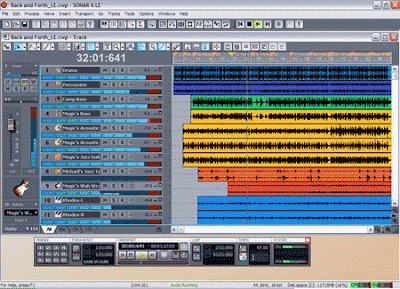
SONAR LESONAR LE

Cakewalk's Sonar LE is a OEM music production software bundled with the following Brand products :

Roland, Edirol, EMU products, Open Labs, Rain Recording, Samson.

Unlike other OEM bundled applications SONAR LE is designed simple yet it provides complete solution for creating music. The best part is that you can record 64 Audio tracks - which is enough for professional work and you will not think for upgrading immediately. Further it supports 256 midi tracks - which again is quite some for programming midi.

In other words although the name is SONAR LE but the features are more like pro versions. You can have 24 track effects enabled simultaneously. Sonar LE gives you the power to make the best sound quality since it supports 24bit / 192Khz recording.

You can use maximum 8 virtual instruments at a time - No problem as you insert more virtual instruments it effects your system load otherwise. So you can always bounce the virtual instrument to audio track ( since you have bounce the midi tracks for mixing ) in case you need  more instruments to be added.

The final restriction is that you can have only 8 simultaneous inputs and outputs. Hence you can record maximum 8 tracks simultaneously which is sufficient these days and as far as output is concerned - all the mixing is done internally these days. Even if you use a outboard you still have 8 outputs to route.

SONAR LE

SONAR LE

SONAR LE also supports ACID™-format loops and Rewire clients such as Project5, Live, or Reason etc.

The new version of SONAR LE (based on the features of SONAR 6) is supposed to be shipping now as it was scheduled in Feb 2007. The new version has support for Windows Vista (32-bit & 64-bit) —NEW , Windows XP Professional x64 Edition—NEW, and Windows XP operating systems. If you are a registered SONAR LE users then you are eligible to purchase upgrades and other products at special discounts.

What else can you expect from a OEM bundle - it gives you more than some paid Audio suites in the pro audio market. You can compare yourself. For more features which I have not detailed you can go to Cakewalk's site at Cakewalk SONAR LE page

I will give some tips and trick on using SONAR LE in my future posts.

Monday, April 2, 2007

TIPS: Freeze VSTi plugin and decrease CPU usage to add more tracks in Nuendo 3

How to Freeze VSTi Plugin:
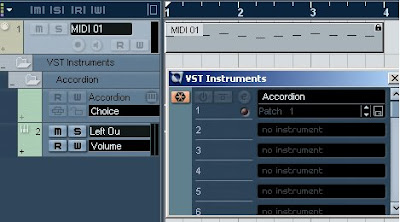
We all face problems when we use a number of midi tracks playing lot of different VSTi's. Some VSTi's almost bring your CPU load to shoot 100% usage and halt. "Freeze" feature is the best solution in such condition. Since all virtual instruments use CPU processing for real time sound generation, we can disable them to save CPU usage. Freeze is a feature which allows you to remove the VSTi while you can still hear the sound. You start sequencing as usual using VSTi and midi track as shown below.

Nuendo 3

After you are done with the track open VST instrument panel and click the Freeze switch on the left as shown below:

Nuendo 3

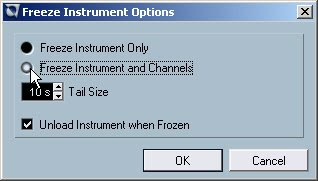
A dialog will open as shown below.

Nuendo 3

You need to select "Freeze instrument only" and check the box "Unload instrument when frozen". If your sound has long sustain tail then you need to adjust your tail size depending on the length of tail otherwise 10s is enough.

Nuendo 3

In case you are using a multi channel VSTi, you can freeze instrument along with all the channels as shown below only if you are done with all the channels.

Nuendo 3

When you press OK button the midi tracks are rendered as wave file and played through the same VSTi audio channel. The midi track gets faded showing that the track is freeze and cannot be played in real time now as shown below.

Nuendo 3

How to unfreeze or enable VSTi Plugin:
If you want to modify or make changes to the tracks you have freeze, you need to unfreeze them in order to enable the real time playback of VSTi through midi track. The track is disabled or faded when it is freeze as shown below and cannot be recorded or played back in real time.

Nuendo 3

First of all open the VST instrument panel and press the Freeze button as shown below to unfreeze the instrument and enable the midi track.

Nuendo 3

A dialog will open, press unfreeze as shown below. This will load the VSTi again and enable the midi track again.

Nuendo 3

After unfreezing you can again start working on the same track for editing or further addition without any problem. It will appear normal as shown below and can be re modified any number of time.

Nuendo 3

Hope now you have become familiar with the freeze function in Nuendo 3 and can use it without any problem.

Popular Posts